

How to Write a List of Figures and Tables for Your Thesis (2026 Guide)
Your thesis list of figures and tables is one of those front-matter sections that students rush through at the very end — and then spend hours fixing after their supervisor sends the document back. Getting it right from the start is straightforward once you understand the logic: every visual element you use to present data deserves a proper entry so that readers can navigate your work without hunting through 80 pages of body text. This 2026 guide covers everything from numbering conventions and caption rules to auto-generating both lists in Microsoft Word and LaTeX, so you can get it done once and get it done correctly.
Whether you are writing a master’s dissertation at UCL, a PhD thesis at Oxford, or an undergraduate research project at MIT, the principles are the same. The details differ by style guide and institution — and we cover APA, Harvard, and common university-specific requirements side by side.
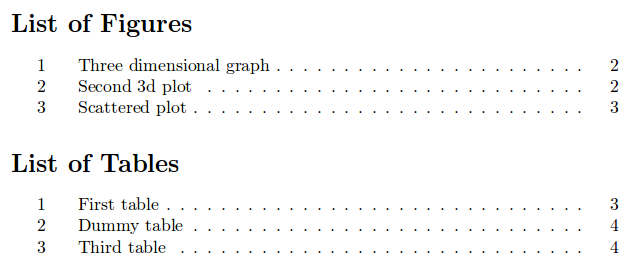
A thesis list of figures is a front-matter page that lists every figure in your document with its number, title, and page number. A separate list of tables does the same for tables. Both sit after your table of contents and use the same page-number style as the rest of the front matter (Roman numerals). In Microsoft Word, they are generated automatically via References > Insert Table of Figures once you have applied captions to every visual. In LaTeX, two commands — listoffigures and listoftables — do the job instantly.
When Do You Actually Need These Lists?
Not every thesis requires a list of figures or a list of tables. The general academic consensus is that these lists become necessary once your document contains more than a handful of visual elements. Most universities and style guides use a threshold of two or more tables, or two or more figures, as the point at which a formal list is expected. If your thesis contains a single graph and no tables, you do not need either list — though you must still caption that graph correctly.
That said, most dissertations at master’s and PhD level contain far more than two visuals. A quantitative study might include a dozen tables presenting regression outputs, descriptive statistics, and reliability coefficients. A qualitative study might include conceptual frameworks, thematic maps, participant flow diagrams, and photographs of fieldwork materials. In both cases, a well-formatted list of figures and a separate list of tables are not just expected — they signal to examiners that you understand professional academic document structure.
Check your department’s submission guidelines first. Many UK universities (including those in the Russell Group) and US graduate schools specify exactly when these lists are mandatory. Harvard GSAS, for example, includes lists of figures and tables in the required front matter for all dissertations, presented with single spacing on dedicated pages.
Where They Go: Placement in Front Matter
Both lists belong in the front matter of your thesis — the preliminary pages that precede Chapter 1. The conventional order, which aligns with guidance from institutions such as Harvard GSAS and standard style guides, is as follows:
| Front Matter Element | Page Numbering | Notes |
|---|---|---|
| Title Page | i (not displayed) | Counts as page i but number not printed |
| Abstract | ii or iii | Varies by institution |
| Table of Contents | Roman numerals | Must itself appear in ToC |
| List of Figures | Roman numerals, continues | Directly after ToC |
| List of Tables | Roman numerals, continues | Directly after List of Figures |
| List of Abbreviations / Glossary | Roman numerals, continues | If applicable |
| Acknowledgements / Dedication | Roman numerals, continues | Order varies by institution |
| Chapter 1 (body text begins) | Arabic numerals (1, 2, 3…) | Page numbering restarts |
The key point is that your overall thesis structure runs from front matter through body chapters to appendices and references, and the list of figures and list of tables are explicitly part of that front matter sequence. They are not optional extras — they are navigational tools. Page numbers in both lists refer to the body text pages (Arabic numerals) where each figure or table appears, even though the list pages themselves use Roman numerals. The section break technique that implements this Roman-to-Arabic switch is explained step by step in the thesis page numbering and section breaks guide.
Numbering Conventions: Sequential vs Chapter-Based
There are two widely used numbering systems for figures and tables in a thesis, and which one you use usually depends on institutional preference and thesis length.
Sequential Numbering
In sequential numbering, figures and tables are numbered from 1 upwards throughout the entire document, regardless of which chapter they appear in. The first figure is Figure 1, the second is Figure 2, and so on. Tables follow the same logic: Table 1, Table 2, Table 3. This system works well for shorter theses (typically undergraduate or master’s dissertations under 30,000 words) where the total number of visuals is manageable.
Chapter-Based Numbering
In chapter-based (or hierarchical) numbering, each figure or table is prefixed with the chapter number. The first figure in Chapter 1 becomes Figure 1.1, the second Figure 1.2, and the first figure in Chapter 2 becomes Figure 2.1. Tables follow the same pattern: Table 1.1, Table 2.3, and so on. This system is standard for longer PhD theses and is the preferred convention at most UK and US research universities. It makes navigation considerably easier when a reader wants to return to a specific visual — they know immediately which chapter it comes from.
Whichever system you choose, apply it consistently throughout the entire thesis. Do not switch between systems mid-document. If your thesis has a mix of chapter-based numbering for the body and letter-based for appendices, that combination is fine — it is the standard approach. What is not acceptable is using Figure 1.1 in one chapter and then reverting to Figure 3 in another.
Caption Rules for Figures and Tables
The most important thing to understand about your thesis list of figures and tables is that it is only as good as your captions. The list is generated directly from captions — either automatically by Word or LaTeX, or manually typed to mirror captions in the body. If a caption is incomplete, inaccurate, or missing, the list entry will be wrong.
Captions for Figures
Figure captions appear below the figure. This is a universal convention across APA, Harvard, Chicago, and most university formatting guidelines including those of Harvard GSAS. The caption includes the figure number, the title, and (where applicable) a source note. The full entry in the list of figures then reproduces the figure number and title with the corresponding page number, right-aligned using a dot leader.
Captions for Tables
Table titles appear above the table — the opposite of figures. This distinction matters because it affects where the reader’s eye goes first. The table number and title sit above the data; any source note or explanatory footnote sits below the table. The list of tables reproduces the table number and title with the page number, just as the list of figures does.
Caption Length in the List vs. the Body
Captions in the body of your thesis can be as long as needed — they should fully describe what the figure or table shows. However, if a caption is very long (more than one line when displayed in the list), most institutions recommend using a shortened version for the list entry. In Word, you can set a shorter list entry by editing the caption field code. In LaTeX, the caption package provides a dedicated short-caption syntax (covered in the LaTeX section below).
When you present tables and figures in your results chapter — which is where most visual content lives — clear and consistent captioning directly affects how easily examiners navigate your findings. For detailed guidance on that chapter’s structure, see our guide on writing a thesis results chapter.
APA 7th Edition Caption Format
APA 7th edition (the Publication Manual, Chapter 7) sets out specific rules for how figures and tables should be labelled. The list of figures and list of tables themselves are not formally prescribed by APA since APA guidelines focus primarily on journal articles — but the caption rules for individual elements apply equally to theses and dissertations.
APA Table Format
- The table number appears above the table in bold: Table 3 or Table 2.1
- The table title appears on the next line in italics, title case: Descriptive Statistics for Participant Demographics
- Column headings use sentence case
- A general note, specific note, or probability note may appear below the table, introduced by Note. in italics
- Source attribution (for reproduced or adapted tables) follows the note: Note. Adapted from “Title of Article,” by Author, Year, Journal Name, Volume(Issue), p. X. Copyright Year by Publisher. Adapted with permission.
APA Figure Format
- The figure number appears below the figure in bold: Figure 4
- The figure title appears on the next line in italics, title case
- A caption (explanatory sentence) follows the title in plain text
- Source attribution sits at the end of the caption: From / Adapted from followed by full reference details and copyright statement
Entries in your list of figures and list of tables should reproduce the figure or table number and its title exactly as it appears in the body. Do not include source notes or captions in the list itself — only the number, the title, and the page number.
Harvard Caption Format
Harvard referencing (as opposed to Harvard GSAS formatting guidelines) does not prescribe a single universal caption format for figures and tables — the “Harvard style” varies by institution and discipline. However, the most widely used convention in UK universities follows these principles:
Harvard Table Format
- Table number and title appear above the table: Table 3: Mean Scores by Group
- The table number may be bold; the title follows after a colon
- The source citation appears below the table in parentheses: (Source: Smith, 2023, p. 45) or as a footnote
- If the table is your own original data, no source is needed below — but you may note “Source: Author’s own data” for clarity
Harvard Figure Format
- Figure number and caption appear below the figure: Figure 2.3: Conceptual Framework for the Study
- The source follows immediately after the caption: (Source: Jones, 2022, p. 12) or (Adapted from Jones, 2022)
- For original figures, “Source: Author” is acceptable
Atlantic TU Library’s Harvard Style LibGuide confirms that when using Harvard referencing for tables, the number and title sit above the data with the source citation placed beneath — consistent with the structure described above. Always cross-reference your specific institution’s formatting handbook, as some universities publish their own Harvard variant with additional rules.
Auto-Generating the Lists in Microsoft Word
The single most valuable skill for thesis formatting in Word is using the built-in captioning system. If you apply captions correctly as you write, generating both lists takes under two minutes. If you have been inserting captions manually as plain text, you will need to retroactively convert them — which takes considerably longer.
Step 1: Apply Captions Correctly
Every time you insert a figure or table, apply a caption using Word’s built-in tool:
- Click on the figure or table to select it
- Go to References > Insert Caption
- In the Label dropdown, select Figure or Table
- Type your caption text after the auto-generated number
- Click OK
Word will number the element automatically. If you are using chapter-based numbering (e.g., Figure 2.1), click the Numbering button in the caption dialog and check “Include chapter number” — then select the heading style you use for chapter headings (Heading 1 is most common).
Step 2: Place Your Cursor and Insert the List
- Navigate to the front matter section where your list should appear (after the Table of Contents)
- Type the heading List of Figures and apply your front-matter heading style
- Press Enter to create a new line below the heading
- Go to References > Insert Table of Figures
- In the Caption Label dropdown, select Figure
- Ensure “Show page numbers” and “Right align page numbers” are ticked
- Select a tab leader style (the row of dots between the title and the page number)
- Click OK
Repeat these steps with Table selected in the Caption Label dropdown to generate your List of Tables on the following page.
Step 3: Update Before Final Submission
Whenever you add, move, or rename a figure or table — or whenever page numbers shift — you must update both lists. Right-click anywhere in the list and select Update Field, then choose Update entire table. Do this as the very last step before saving your final PDF, after all editing is complete.
Customising Caption Style
Word’s default caption style may not match your university’s formatting requirements. To adjust font, size, or spacing: go to Home > Styles, right-click Caption, select Modify, and adjust as needed. Changes apply to all captions in the document instantly. For the full picture of how captions integrate with the rest of your Word formatting architecture — including heading styles, section breaks, and TOC generation — see the step-by-step Word thesis formatting guide.
Auto-Generating the Lists in LaTeX
LaTeX makes list generation even more straightforward than Word, provided you use the caption{} command inside every figure and table environment. The front matter of a typical LaTeX thesis looks like this:
frontmatter
tableofcontents
listoffigures
listoftables
mainmatter
Those two commands — listoffigures and listoftables — generate complete, automatically numbered lists with page references. LaTeX must be compiled twice for the lists to populate correctly, as the first pass records the entries and the second pass prints them.
Short Captions for Long Titles
If a figure caption is long and detailed, the same long text will appear in the list of figures — which often looks cluttered. Use the optional short-caption argument to specify a shorter version for the list:
begin{figure}[htbp]
  centering
  includegraphics[width=0.8textwidth]{my_figure.pdf}
  caption[Short caption for list of figures]{Full descriptive caption that appears beneath the figure in the body text, including source attribution if required.}
  label{fig:my_figure}
end{figure}
The text inside the square brackets [...] goes into the list of figures; the text inside the curly brackets {...} appears under the figure itself. The same syntax works for tables using caption[short]{long} inside a table environment.
Chapter-Based Numbering in LaTeX
If you are using the book or report document class (standard for theses), LaTeX automatically applies chapter-based numbering: Figure 2.1, Table 3.4, and so on. No additional package is required. If you are using the article class (less common for theses), numbering will be sequential unless you load the chngcntr package and configure it.
Renaming the List Titles
The default English titles are “List of Figures” and “List of Tables.” To customise:
renewcommand{listfigurename}{Figures}
renewcommand{listtablename}{Tables}
For multilingual documents using the babel package, wrap these commands within addtocaptionsenglish{...} to ensure they override the language defaults correctly.
Formatting the List Page Itself
Beyond the content of the entries, the presentation of the list page matters for the overall professional quality of your document. Here are the key formatting decisions:
Heading
Centre the heading at the top of the page. Most institutions accept either all-caps (“LIST OF FIGURES”) or title case (“List of Figures”). Use whichever format matches your table of contents heading and other front-matter headings. Consistency is more important than any particular style choice.
Entry Format
Each entry should display:
- The figure or table number (e.g., Figure 2.1 or Table 3)
- A brief descriptive title — matching the caption exactly (or the shortened version if one was set)
- A tab leader (a row of dots) connecting the title to the page number
- The page number, right-aligned
Do not include bold or italic formatting in the list entries themselves, even if the caption in the body uses those styles. List entries are plain text with a page reference.
Spacing
Harvard GSAS specifies that single spacing is acceptable for lists of figures and tables. Most UK institutions also permit single spacing for these front-matter lists, even if the body text is double-spaced. Use a blank line between entries if the list is long, to improve readability.
Indent for Wrapped Lines
If a title wraps to a second line, the second line should indent to align with the beginning of the title text on the first line — not with the figure number. This keeps the dot leader column clean and the page number column visually aligned.
Six Common Mistakes (and How to Fix Them)
1. Using Plain-Text Captions Instead of Word’s Caption Tool
The most widespread mistake is typing captions manually as regular text rather than using Word’s Insert Caption feature. When you do this, Word has no way to detect those elements when generating the list. Fix: retroactively select each plain-text caption, delete it, and reapply it via References > Insert Caption. It takes time, but it is the only reliable path to an accurate auto-generated list.
2. Inconsistent Numbering
Switching between sequential and chapter-based numbering within the same document, or accidentally deleting a caption (which resets the auto-number sequence) creates gaps or duplicates. Fix: check the list after generating it. Any numbering anomalies in the list reflect anomalies in the body. In Word, right-click any caption and select “Update Field” to refresh the sequence before generating the list.
3. Captions That Don’t Match the List Entry
If you edit a caption in the body after generating the list but forget to update the list, the entries will be out of sync. Fix: always update both lists as your final pre-submission step.
4. Including Figures From the Appendix in the Wrong Position
Appendix figures and tables should appear at the end of the list, after all body-chapter entries, using the letter-based numbering (Figure A.1, Table B.2). Some students accidentally insert appendix captions in the wrong order or omit them entirely. Fix: verify the list sequence matches the physical order of all elements in the document. For more on how appendix figures integrate with the broader appendix structure, see the guide on thesis appendix labelling and organisation.
5. Wrong Caption Position (Figure Above, Table Below)
Placing a figure caption above the figure, or a table title below the table, reverses the universal convention. Examiners notice this immediately. Fix: figures always have their caption below; tables always have their title above.
6. Forgetting to Update Page Numbers After Final Edits
Adding or removing text in the body shifts page numbers. If you generate your lists early and then continue editing, the page numbers in the list will be wrong. Fix: update both lists — and your table of contents — as the final step before converting to PDF.
For a complete picture of how the list of figures and tables fits within the overall structure of your submission, see our thesis structure guide covering every chapter with examples. And if you are working through a full PhD thesis, the PhD thesis chapter-by-chapter guide covers front matter requirements in depth.
Frequently Asked Questions
Do I need both a list of figures and a list of tables, or can I combine them?
In most cases you should have two separate lists — one for figures and one for tables — rather than a combined list. Most university formatting guidelines and style guides treat figures and tables as distinct element types and expect separate lists. A combined “List of Figures and Tables” is only acceptable when the total number of visuals is very small (typically fewer than five in total) and your institution’s submission guidelines explicitly permit it. When in doubt, use separate lists.
What is the difference between Figure 1 and Figure 1.1?
Figure 1 uses sequential numbering — figures are counted from 1 to the end of the thesis regardless of chapter. Figure 1.1 uses chapter-based numbering — the first digit is the chapter number, the second is the figure’s position within that chapter. So Figure 1.1 is the first figure in Chapter 1, Figure 2.3 is the third figure in Chapter 2, and so on. Chapter-based numbering is the standard for longer theses (PhD level) and is the default in LaTeX’s book and report document classes. For shorter master’s or undergraduate dissertations, sequential numbering is equally acceptable unless your institution specifies otherwise.
Should the list of figures include figures from the appendix?
Yes — all figures in your thesis, including those in appendices, should appear in the list of figures. Appendix figures use a letter prefix (Figure A.1, Figure B.2) and are listed after all body-chapter entries. The same applies to tables: all appendix tables (Table A.1, etc.) appear at the end of the list of tables. This ensures readers can locate any figure or table in the document from a single reference point.
Does the list of figures itself need to appear in the table of contents?
Yes, in almost all cases. The list of figures and the list of tables are both listed as entries in your table of contents, alongside the abstract, acknowledgements, and other front-matter sections. They are given their Roman-numeral page numbers in the ToC. Harvard GSAS explicitly requires this. In Word, if you apply a consistent heading style to the “List of Figures” heading on that page, it will automatically appear in your table of contents when you update it.
How do I create a list of figures in LaTeX if I’m using the article class?
The listoffigures and listoftables commands work in all standard LaTeX document classes, including article. Place them in your preamble or front matter section. Note that with the article class, figures will be numbered sequentially (Figure 1, Figure 2) rather than by chapter, because the article class does not use chapters. If you want chapter-based numbering in an article-class document, load the chngcntr package and use counterwithin{figure}{section}. Most thesis templates use the book or report class precisely to get chapter-based numbering automatically.
What page numbers do I use in the list of figures — Roman or Arabic?
The list of figures page itself uses Roman numerals (it is a front-matter page), but the page numbers within the list — the numbers that point to where each figure appears — are Arabic numerals, because they refer to pages in the body of the thesis. So a typical list entry reads: “Figure 2.1 Conceptual Framework for the Study ………….. 34” where 34 is an Arabic numeral referring to the body page. This distinction sometimes confuses students but it is consistent with how the table of contents works.
Getting Your Thesis Formatting Right the First Time
Formatting issues — including problems with the list of figures and tables — are among the most common reasons supervisors send first drafts back for revision. Every caption applied correctly during writing is one fewer correction in the final push before submission.
If you are building your thesis from scratch and want a structured workflow that handles formatting, citations, and chapter development alongside your writing, Tesify provides AI-assisted thesis writing designed for UK and US academic standards — including guidance on front-matter elements like the lists covered in this guide.
Write your thesis with AI
Structure, draft, cite, and format your thesis faster with Tesify’s AI writing tools, automatic bibliography, and plagiarism checker. Free to start, no credit card required.




Leave a Reply