

Thesis Table of Contents in 2026: Formatting, Numbering, and Auto-Generation in Word and LaTeX
Your thesis table of contents is the first thing most examiners read after the abstract. Before a committee member turns to Chapter 3 or skims your methodology, they use your TOC as a map — scanning section titles for logical flow, checking whether your argument builds coherently from introduction through to conclusion. A cluttered, manually typed, or inconsistently numbered contents page signals carelessness before you have even made your case. Getting the thesis table of contents right in 2026 means understanding both the mechanical process of auto-generation and the institutional expectations that govern what belongs there and what does not.
This guide walks you through every step: applying heading styles correctly in Microsoft Word, using tableofcontents in LaTeX with the hyperref package, choosing between decimal and outline numbering, and knowing which front-matter sections to list and which to leave out. Whether you are submitting a master’s dissertation at UCL, a PhD thesis at the University of Michigan, or an undergraduate capstone at the University of Sydney, the principles here apply directly to your submission.
A thesis table of contents lists every chapter, section, and sub-section alongside its page number, using either decimal (1.1, 1.2) or outline (I, A, 1) numbering. In Microsoft Word, apply Heading 1–3 styles to all headings and insert it via References → Table of Contents → Custom Table of Contents. In LaTeX, place tableofcontents after begin{document} and compile twice. Front matter — title page, abstract, acknowledgements — is typically listed but uses lowercase Roman numeral pagination; main chapters use Arabic numerals.
Why Your Thesis TOC Matters to Examiners
Examiners at institutions such as Newcastle University and the University of Manchester routinely use the table of contents as a pre-read before engaging with the full text. The TOC reveals whether a thesis has a coherent architecture: are the chapter titles descriptive? Do section headings cascade logically from one level to the next? Is there a visible argument thread from the literature review through to the conclusion?
Beyond initial impressions, a mismatched TOC — where page numbers or titles differ from what appears in the body — is flagged as a formal defect at many institutions. The University of Manchester’s Presentation of Theses Policy (updated March 2026) makes clear that the TOC must reflect the document accurately at the point of submission. At Newcastle University, guidelines explicitly require the TOC to “list in sequence all relevant chapters, sections and subsections; appendices, references and bibliography, and any other supporting material, with the relevant page numbers.” These are not suggestions; they are submission criteria.
For a full picture of how the TOC fits within the overall document architecture, see this guide to every chapter in your thesis explained with examples.
What to Include (and What to Leave Out)
Most submission errors trace back to students either over-populating their TOC with every sub-heading imaginable or under-populating it and omitting appendices and reference lists. Here is a clear breakdown.
Sections that must appear in your TOC
- Abstract — listed with its page number (usually page i or ii in Roman numerals).
- Acknowledgements — included in the front matter listing.
- List of Figures / List of Tables — each as a separate entry if you have more than five figures or tables; combined if fewer. For full guidance on formatting these lists, see the dedicated guide on thesis list of figures and tables.
- List of Abbreviations — if your thesis uses more than ten specialised acronyms.
- All chapter titles — at Heading 1 level, with Arabic page numbers.
- All section headings — at Heading 2 level, indented one level.
- Sub-section headings — at Heading 3 level, indented two levels (include these only if your thesis uses them consistently throughout).
- References / Bibliography — as a top-level entry, not nested under a chapter.
- Appendices — each appendix listed individually (Appendix A, Appendix B, etc.) with its title and page number. For guidance on structuring appendix content effectively, see this detailed walkthrough on how to handle thesis back matter and appendices.
Sections to omit from your TOC
- The title page — it is never listed; it carries no page number in the pagination sequence.
- The TOC page itself — listing the contents page inside the contents page creates a circular reference and is universally excluded.
- Headings below Heading 3 — Heading 4 and deeper levels should not appear in the TOC. If you need that level of granularity, consider restructuring your chapter or using a numbered sub-list in the text itself.
- Figure and table captions — these belong in a separate List of Figures/Tables, not the main TOC.
A note on depth
Most UK and US universities recommend no more than three levels of heading in the TOC. The University of Illinois Graduate College advises that the contents list should “show chapter and section titles, demonstrating the relationship of the parts to each other by indentation and numbering.” Beyond three levels, a TOC becomes cognitively unwieldy and suggests the thesis itself may need structural editing.
Decimal vs Outline Numbering: Which to Use
Two broad numbering conventions exist for thesis headings: decimal notation and outline notation. Your institution’s style guide will specify which one to use; if it does not, read recent successful theses in your department on your institutional repository for precedent.
Decimal notation (recommended for STEM and social sciences)
Decimal notation assigns numbers at every level, separating them with a full stop:
- 1 — Chapter 1: Introduction
- 1.1 — Research Aims and Objectives
- 1.2 — Research Questions
- 1.2.1 — Primary Research Question
- 1.2.2 — Sub-questions
- 2 — Chapter 2: Literature Review
This system makes hierarchical relationships immediately visible and is standard practice across engineering, psychology, economics, and most health sciences. Oxford, Imperial, and MIT theses overwhelmingly use decimal notation.
Outline notation (common in humanities)
Outline notation uses a mix of Roman numerals, capital letters, and Arabic numbers:
- I. Introduction
- A. Research Context
- B. Aims and Scope
- II. Literature Review
This is more common in history, literature, and philosophy theses, particularly at US liberal arts institutions. It is also what the default Word outline style produces. However, it becomes awkward beyond three levels, which is why STEM disciplines generally prefer decimal.
Unnumbered headings
Some institutions — particularly in the UK arts and humanities — prefer no numbering at all, with hierarchy conveyed through indentation, font size, and bold/italic weight alone. If your department uses this convention, your TOC still follows the same structural logic; you simply omit the numeric prefixes.
Front-Matter Pagination: Roman vs Arabic Numerals
One of the most confusing aspects of thesis formatting is the dual pagination system. Almost every major university — Newcastle, Manchester, Illinois, Florida, Michigan — requires the same convention:
- Front matter (everything before Chapter 1: abstract, acknowledgements, TOC, list of figures/tables, list of abbreviations) uses lowercase Roman numerals: i, ii, iii, iv…
- Main body (Chapter 1 through to References and Appendices) uses Arabic numerals: 1, 2, 3…
- The title page counts as page i but the number is not printed on the page itself.
In Microsoft Word, you implement this by using section breaks. Insert a Next Page section break between the front matter and Chapter 1, then unlink the footer from the previous section and change the page numbering format. In LaTeX using the book or report document class, this is handled automatically: frontmatter switches to Roman numerals and mainmatter resets the count and switches to Arabic.
When building your TOC, page numbers in the front-matter listing will read as “i”, “ii” etc., while Chapter 1 will read as “1”. This is correct and expected. Examiners who see Chapter 1 starting on page “17” (because the student forgot to switch numeral systems) will immediately flag it. The complete procedure for section breaks and pagination is covered in the thesis page numbering and section breaks guide.
Auto-Generating Your TOC in Microsoft Word
The single most important rule for a Word TOC: never type it manually. A manually typed contents page will drift out of sync the moment you add a paragraph or change a heading. Word’s automatic TOC updates in seconds and eliminates transcription errors.
Step 1: Apply heading styles throughout your document
Select every chapter title and apply the Heading 1 style from the Home ribbon. Apply Heading 2 to all section headings and Heading 3 to sub-sections. Do this for both main body headings and front-matter headings (Acknowledgements, Abstract, List of Figures).
If your institution requires specific fonts and sizes (for instance, 14pt bold for chapter titles and 12pt bold for section headings, as Newcastle specifies), modify the Heading styles rather than overriding them manually. Right-click a style in the Styles pane → Modify → set the font, size, and spacing. This preserves the structural link the TOC depends on.
Step 2: Insert a Custom Table of Contents
- Place your cursor on the blank page where the TOC will appear (after the abstract and acknowledgements).
- Go to References → Table of Contents → Custom Table of Contents.
- In the dialogue, set Show Levels to 3 (or 2 if your institution specifies no deeper than Heading 2).
- Click Modify to adjust the visual appearance of TOC levels — font, size, and spacing — so they match your institution’s requirements.
- Ensure Show page numbers and Right align page numbers are both ticked.
- Choose a Tab leader (dotted line between title and page number) — “…” is standard in academic submissions.
- Click OK.
The University of Michigan Library recommends making your TOC easier to read by formatting each entry as single-spaced with 12 points of space after, creating clear visual separation without excessive white space. You can apply this by modifying the TOC 1, TOC 2, and TOC 3 styles inside the Custom TOC dialogue.
Step 3: Handle section breaks for dual pagination
To correctly reflect Roman numeral page numbers in the front matter and Arabic page numbers in the body, you must have already set up section breaks and unlinked footers before generating the TOC. If you generate the TOC and then fix pagination, the page numbers will be wrong — update the TOC afterwards using the method in Step 5.
Step 4: Exclude the TOC from displaying in itself
Word automatically excludes the TOC page from the generated list because the TOC heading itself is styled as a standard paragraph or with a non-mapped style, not as Heading 1. If you accidentally applied a Heading style to “Table of Contents,” remove it (set it to Normal or a dedicated TOC Title style) so it does not appear as a self-referential entry.
Step 5: Update the TOC before final submission
After completing every revision, right-click anywhere on the TOC and select Update Field → Update entire table. Never choose “Update page numbers only” for your final submission — you may have renamed headings during revision. Alternatively, press Ctrl+A (select all) then F9 to update all fields in the document simultaneously, including figure numbers, cross-references, and the TOC.
For a broader walkthrough of formatting a complete dissertation in Word — including margins, styles, headers and footers — refer to the step-by-step guide to formatting your thesis in Microsoft Word.
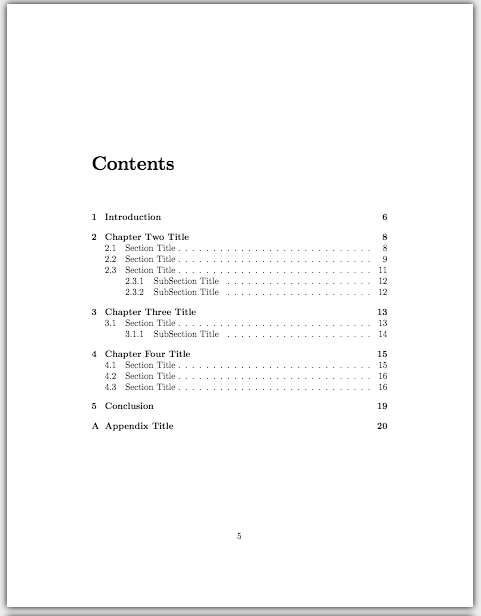
Generating the TOC in LaTeX
LaTeX produces a TOC that is, by default, more typographically precise than Word’s. The downside is that it requires two compilation passes to fully resolve, and customisation requires loading the right packages.
The basic command
In any standard LaTeX document class (article, report, book), generating a TOC requires a single command placed after begin{document}:
begin{document}
frontmatter       % switches to Roman numeral pagination
maketitle
tableofcontents   % generates the TOC
listoffigures     % optional: list of figures
listoftables      % optional: list of tables
mainmatter        % resets to Arabic numerals, page 1
include{chapters/chapter1}
The frontmatter and mainmatter commands are available in the book and report document classes. They handle the Roman-to-Arabic numeral switch automatically. For the article class, you must manage this manually.
Why you must compile twice
LaTeX’s first compilation pass reads all the sectioning commands (chapter, section, subsection) and writes them to an auxiliary .toc file. The second pass reads that file and typesets the actual table of contents with the correct page numbers. If you compile only once, the TOC will either be empty or show incorrect page numbers from the previous run. Using Overleaf eliminates this problem — Overleaf automatically performs multiple compilation passes.
Controlling TOC depth
By default, LaTeX includes sections down to the subsubsection level (depth 3). To restrict the TOC to chapters and sections only, add this to your preamble:
setcounter{tocdepth}{2} % 1 = chapters only; 2 = chapters + sections; 3 = + subsectionsAdding entries that LaTeX excludes by default
Starred sectioning commands (chapter*, section*) produce headings that do not appear in the TOC because they generate no anchor. To include them — for instance, for your Abstract or Bibliography — use phantomsection followed by addcontentsline:
phantomsection
addcontentsline{toc}{chapter}{Abstract}
chapter*{Abstract}
Hyperlinking with the hyperref package
Loading hyperref makes the TOC entries clickable in the PDF output — each entry becomes a hyperlink that jumps to the corresponding section. Load it last in your preamble (after all other packages) and configure it for academic output:
usepackage[
  colorlinks=true,
  linkcolor=black,
  citecolor=black,
  urlcolor=blue,
  bookmarksopen=true,
  pdfauthor={Your Name},
  pdftitle={Your Thesis Title}
]{hyperref}
Setting linkcolor=black ensures TOC entries are not coloured in the printed version while remaining clickable in the digital PDF. Many examiners receive both formats; this setting satisfies both requirements.
Customising TOC appearance with tocloft
The tocloft package gives fine-grained control over spacing, fonts, and indentation in the TOC. A common requirement is adding dot leaders between section titles and page numbers:
usepackage{tocloft}
renewcommand{cftchapdotsep}{cftdotsep}  % add dot leaders to chapter entries
setlength{cftbeforechapskip}{6pt}         % space before chapter entries
For a thorough comparison of LaTeX and Word for thesis writing — including Overleaf templates, BibTeX citation management, and when to switch tools — this in-depth guide on LaTeX vs Word for thesis writing and TOC generation covers the decision framework in detail.
Updating and Finalising Your TOC Before Submission
Generating the TOC early in your writing process is good practice. Keeping it accurate throughout is essential. Here is a practical routine for the final two weeks before submission.
Two weeks before submission
- Perform a full update of all fields (Word: Ctrl+A → F9; LaTeX: clean and recompile twice).
- Cross-check every chapter title in the TOC against the corresponding heading in the body — they must be word-for-word identical, including capitalisation.
- Confirm all appendix entries are present with correct titles (Appendix A: Survey Instrument, not just “Appendix A”).
The day before submission
- Make your last round of textual edits, then perform a final field update.
- Print or export to PDF and manually verify the first page number of each chapter against the TOC entry.
- Check that front matter entries show Roman numerals and main body entries show Arabic numerals in the correct sequence.
- Confirm the TOC itself is not listed within the TOC.
After PDF export
Open the PDF in Adobe Acrobat Reader or Preview and check the bookmarks panel (the sidebar). A correctly set up hyperref in LaTeX, or a properly generated Word TOC, will populate the PDF bookmarks automatically — providing a secondary navigation layer that examiners at digital-first institutions particularly appreciate.
Six Common TOC Mistakes and How to Fix Them
| Mistake | Why It Happens | Fix |
|---|---|---|
| TOC page numbers do not match the body | TOC was generated before final edits; not updated | Update all fields (Ctrl+A → F9 in Word; recompile in LaTeX) |
| Chapter 1 starts on page 15 instead of page 1 | Section break not inserted; pagination not reset | Insert Next Page section break; unlink footer; restart numbering from 1 |
| Headings in body differ from TOC entries | Heading was edited manually after TOC generation | Always edit the body heading, then update the TOC — never edit the TOC directly |
| Appendices missing from TOC | Appendix headings not styled as Heading 1 / not using chapter in LaTeX | Apply Heading 1 in Word; use chapter{Appendix A: Title} or addcontentsline in LaTeX |
| References section absent from TOC | Written as a starred heading (chapter*) or plain bold text | Use Heading 1 in Word; in LaTeX add phantomsection + addcontentsline before chapter*{References} |
| TOC goes four or five levels deep | Show Levels set to 4+ in Word; tocdepth not set in LaTeX | Set Show Levels to 3 in Word; add setcounter{tocdepth}{2} in LaTeX preamble |
Frequently Asked Questions
Does the abstract go in the thesis table of contents?
Yes, in most UK and US universities the abstract is listed in the TOC as a front-matter entry with its Roman numeral page number. The abstract heading itself is typically styled at Heading 1 level so Word picks it up automatically, or added via addcontentsline in LaTeX if using a starred chapter* command. Check your institution’s specific guide — a small number of universities exclude the abstract from the TOC listing.
Should I use decimal numbering or outline numbering for my thesis?
Decimal numbering (1, 1.1, 1.1.1) is the dominant convention in STEM, social sciences, business, and health disciplines at universities such as Oxford, Imperial, and MIT. Outline numbering (I, A, 1) is more common in humanities. If your institution’s style guide does not specify, browse recent theses in your department’s repository: what your examiners are accustomed to reading is usually the best guide.
How many levels should my thesis table of contents show?
Three levels (chapter, section, sub-section — i.e. Heading 1, 2, and 3 in Word; chapter, section, subsection in LaTeX) is the standard for most theses. Going deeper makes the TOC visually cluttered and rarely adds navigational value. Most UK and US university formatting guides either specify three levels or advise against going below three without a compelling structural reason.
In LaTeX, why is my table of contents blank after the first compile?
This is expected behaviour. LaTeX’s first compilation pass writes sectioning information to a .toc auxiliary file. The TOC can only be populated on the second pass when LaTeX reads back that file. Always compile at least twice (or use a tool like latexmk which handles this automatically). On Overleaf, multiple passes happen automatically, so this issue does not arise.
Do appendices appear in the thesis table of contents?
Yes — Newcastle University, Manchester, and most other institutions require each appendix to be listed individually with its full title and page number. In Word, apply Heading 1 to each appendix title (e.g. “Appendix A: Interview Schedule”). In LaTeX using the book class, place appendices after appendix and use the standard chapter{} command — LaTeX automatically relabels chapters as A, B, C from that point. For more on structuring appendix content, see this guide on thesis back matter and appendices.
Can I manually edit entries in my Word TOC?
You can, but you should not. Any manual changes to the TOC will be overwritten the next time you update the field. The correct workflow is to edit the heading text in the document body, then refresh the TOC via Update Field. The only exception is if you need to add an entry that Word cannot detect automatically — in that case, use a tc field code to add it without disrupting the automatic TOC logic.
Build Your Thesis with Confidence
A well-structured TOC is a symptom of a well-structured thesis. If you find yourself wrestling with heading hierarchies or wondering whether your argument hangs together chapter by chapter, Tesify can help you plan, draft, and format your dissertation from the ground up — with AI guidance calibrated to your specific university’s requirements.
Write your thesis with AI
Structure, draft, cite, and format your thesis faster with Tesify’s AI writing tools, automatic bibliography, and plagiarism checker. Free to start, no credit card required.





Leave a Reply