
Thesis Page Numbering and Section Breaks in 2026: The Roman-to-Arabic Setup Every Examiner Expects
Submitting a thesis with incorrect thesis page numbering is one of those avoidable formatting errors that flags a lack of care before an examiner reads a single sentence. The convention is consistent across Oxford, Cambridge, UCL, Harvard, MIT, and virtually every Russell Group and Ivy League institution: lowercase Roman numerals for preliminary pages, Arabic numerals starting at 1 from Chapter One, and no visible number on the title page. Yet many students arrive at submission week without a clear, step-by-step procedure for making Word — or LaTeX — implement this correctly. This guide fixes that. Follow it once and you will never touch your page-number settings again.
frontmatter and mainmatter commands handle this automatically.
Why Examiners Care About Page Numbering
During a viva or binding-check, examiners and graduate administrators refer to specific pages by number. If your Roman numeral section runs into your Arabic section — or if page 1 appears on the abstract rather than the first page of Chapter One — the document becomes harder to navigate and, more importantly, signals that you have not read your institution’s formatting guidelines. At many UK universities, a thesis can be returned for correction before the viva even takes place if formatting is non-compliant.
The University of Michigan’s Rackham Graduate School states clearly that all page numbers must be placed at the bottom centre of each page, with Roman numerals in the front matter and Arabic numerals in the body. Oxford’s guidance requires page numbers in the upper right or centred at the bottom on every page except the title page. These requirements are not aesthetic preferences — they are submission requirements.
The Standard Thesis Numbering Scheme Explained
Across the institutions where most readers of this guide will submit — Oxford, Cambridge, UCL, Imperial, Edinburgh, Harvard, MIT, Stanford, and their equivalents — the standard numbering scheme has three rules:
| Section | Number style | First visible number | Notes |
|---|---|---|---|
| Title page | Roman (i) | Suppressed — not shown | Counts as page i but displays nothing |
| Abstract / declaration | Roman (ii) | ii | Some institutions suppress abstract too; check your guidelines |
| Acknowledgements, ToC, lists | Roman (iii, iv, v…) | iii or as sequenced | Continues from abstract |
| Chapter One and beyond | Arabic (1, 2, 3…) | 1 | Counter restarts at 1; independent of front matter |
| References and appendices | Arabic (continues) | Continues from last chapter | No new restart unless your institution specifies otherwise |
Notice that the page counter does not restart between chapters, references, or appendices — it runs continuously from Chapter One through to the very last page. The only restart is at the transition from front matter to Chapter One.
Front Matter: What Gets Roman Numerals
Understanding which pages belong to the front matter is important before you start inserting section breaks. Standard front-matter elements, in order, include:
- Title page — page i, number suppressed
- Abstract / executive summary — typically page ii
- Declaration of authorship — required by most UK institutions
- Acknowledgements
- Table of contents
- List of figures (if applicable)
- List of tables (if applicable)
- List of abbreviations / glossary (if applicable)
- Preface (if applicable)
Everything before Chapter One carries a Roman numeral. The moment the text of Chapter One begins, Arabic numbering starts at 1. This is the single most important rule of thesis page numbering, and everything in the sections below serves to implement it technically.
For more on structuring the preliminary pages of your document, including how to present your abstract and acknowledgements within the front matter sequence, the complete guide to how to write a thesis step by step covers the full chapter order from front matter to references. The guide on creating a thesis list of figures and tables covers how these two front-matter lists are correctly paginated within the Roman-numeral zone.
Word: Inserting Section Breaks Correctly
The critical technical step in Word is inserting a Next Page section break between your last front-matter page and the first page of Chapter One. A section break is what allows Word to apply different page-number formats to different parts of your document. Without it, you cannot have Roman numerals in one part and Arabic in another.
Step 1: Show formatting marks
Before inserting anything, turn on formatting marks so you can see exactly where your section breaks land. Go to Home → Paragraph → Show/Hide (¶). This reveals all paragraph marks, spaces, and crucially, section break markers.
Step 2: Position your cursor
Click at the very end of your last front-matter page — the last character on the last line of your list of abbreviations, preface, or whichever element comes just before Chapter One.
Step 3: Insert a Next Page section break
Go to Layout → Breaks → Section Breaks → Next Page. Do not use a Continuous or Even/Odd section break here — you need Next Page specifically so that the Arabic numbering starts on a fresh page.
After inserting, you should see a marker reading “Section Break (Next Page)” at the point where your front matter ends. Chapter One content now lives in Section 2.
What if your Chapter One is already on a new page?
If you previously used a manual page break (Ctrl+Enter) to push Chapter One to a new page, delete it and replace it with the Next Page section break. Manual page breaks do not create independent sections — they only force a page change within the same section, which means the page-number formatting will bleed across.
Word: Unlinking Headers and Footers Between Sections
By default, Word links the header and footer of each new section to the previous one. This means that if you format the footer in Section 2, the change propagates back to Section 1, defeating the whole point of the section break. Unlinking is therefore mandatory before you format either section’s page numbers.
Step 1: Open the footer in Section 2
Double-click the footer area on any page in Chapter One (Section 2). The Header & Footer tab will appear in the ribbon. You will see a small label reading “Same as Previous” in the footer area.
Step 2: Break the link
In the Header & Footer tab, click Link to Previous to toggle it off. The “Same as Previous” label disappears. Section 2’s footer is now independent.
Step 3: Repeat for Section 1 if needed
If your title page is a separate section from the rest of your front matter (which it should be — see the section on suppressing numbers below), you will need to go through this same unlinking process between Section 1 and Section 2 as well.
Word: Formatting Page Numbers in Each Section
With the section break in place and the link broken, you can now format each section’s page numbers independently.
Section 1 — Front matter (Roman numerals)
- Double-click the footer in any front-matter page to open the footer editor.
- Go to Insert → Page Number → Format Page Numbers.
- Under Number format, select i, ii, iii, … (lowercase Roman).
- Under Page numbering, select Start at: i.
- Click OK, then use Insert → Page Number → Bottom of Page → Plain Number 2 (centred) to place the actual number field in the footer.
Section 2 — Body (Arabic numerals)
- Double-click the footer on any Chapter One page.
- Go to Insert → Page Number → Format Page Numbers.
- Under Number format, select 1, 2, 3, … (Arabic).
- Under Page numbering, select Start at: 1.
- Click OK. The footer should now show “1” on the first page of Chapter One.
After completing these steps, scroll through your document to verify: the abstract shows “ii”, the table of contents shows “iii” (or whichever Roman numeral it falls on), and Chapter One opens at “1”.
If you need a broader walkthrough of formatting your entire thesis in Word — including margins, heading styles, and line spacing — the complete step-by-step Word formatting guide for theses covers every setting in one place and explains how section breaks interact with the automatic TOC and caption numbering.
Suppressing the Number on the Title Page
The title page is conventionally counted as page i but must not display a number. There are two reliable methods.
Method A: “Different First Page” option
If your entire front matter is in Section 1 (i.e. you have not split the title page into its own section), open the footer, tick Different First Page in the Header & Footer tab, then delete the page number field from the first-page footer only. This hides the number on page i while keeping it visible on page ii onwards.
Method B: Separate section for the title page
A cleaner approach that many institutions recommend is to make the title page its own section (Section 1), the rest of the front matter Section 2 (Roman numerals starting at ii), and the body Section 3 (Arabic starting at 1). This gives you granular control and avoids the quirks of the “Different First Page” tick-box.
To do this, position the cursor at the end of the title page and insert a Next Page section break. Then unlink Section 2’s footer from Section 1’s. In Section 2, format with Roman numerals starting at ii. In Section 1, do not insert any page number at all — simply leave the footer empty.
Which method should you use?
Check your institution’s guidelines. If they specify only that the title page should not display a number, either method works. Method B is cleaner and more predictable; Method A is faster if you are already close to submission. Both are widely accepted.
Five Common Word Page-Numbering Mistakes (and How to Fix Them)
1. Arabic numbers appearing from the abstract
Cause: No section break was inserted, so the entire document is one section with Arabic formatting.
Fix: Insert a Next Page section break before Chapter One. Format Section 1 with Roman numerals starting at i.
2. Both sections show Roman numerals
Cause: The Section 2 footer is still linked to Section 1.
Fix: Open the Section 2 footer, toggle off Link to Previous, then reformat as Arabic starting at 1.
3. Chapter One starts at page 8 instead of 1
Cause: The Arabic section is set to “Continue from previous section” rather than “Start at: 1”.
Fix: In Section 2, go to Format Page Numbers and explicitly select Start at: 1.
4. The title page shows “i”
Cause: The “Different First Page” box is unticked, or Method B was not implemented properly.
Fix: Either tick “Different First Page” and delete the number from the first-page footer, or isolate the title page in its own blank-footer section.
5. Page numbers disappear after editing the document
Cause: You accidentally deleted the page number field while editing the footer, or Word re-linked sections after a cut-and-paste operation.
Fix: Open the footer for the affected section, re-insert the page number from Insert → Page Number, and re-check that Link to Previous is still off.
Getting the structure of your front matter right — including your table of contents entries and how they reflect Roman-numeral pages — is directly connected to page numbering. The guide to writing your dissertation abstract covers how to format the abstract as a standalone front-matter page, including its page-number placement. And once your page numbers are set, the thesis table of contents guide explains how to auto-generate a TOC that correctly reflects both Roman and Arabic page numbers.
LaTeX: The Two-Command Solution
If you are writing in LaTeX using the book document class (which is standard for PhD theses and most master’s dissertations at research universities), the Roman-to-Arabic transition is handled by two built-in commands that require no manual tinkering.
The frontmatter and mainmatter commands
According to the Overleaf documentation on page numbering, adding frontmatter before your preliminary pages automatically switches page numbering to lowercase Roman numerals and resets the counter to i. Adding mainmatter before Chapter One switches to Arabic numerals and resets the counter to 1.
documentclass{book}
begin{document}

frontmatter          % Switches to Roman numerals (i, ii, iii...)
include{titlepage}   % Title page — number suppressed by default in book class
include{abstract}
include{acknowledgements}
tableofcontents
listoffigures
listoftables

mainmatter           % Switches to Arabic numerals, restarts at 1
include{chapter1}
include{chapter2}
% ...

backmatter           % Optional: for bibliography and appendices
include{bibliography}
include{appendices}

end{document}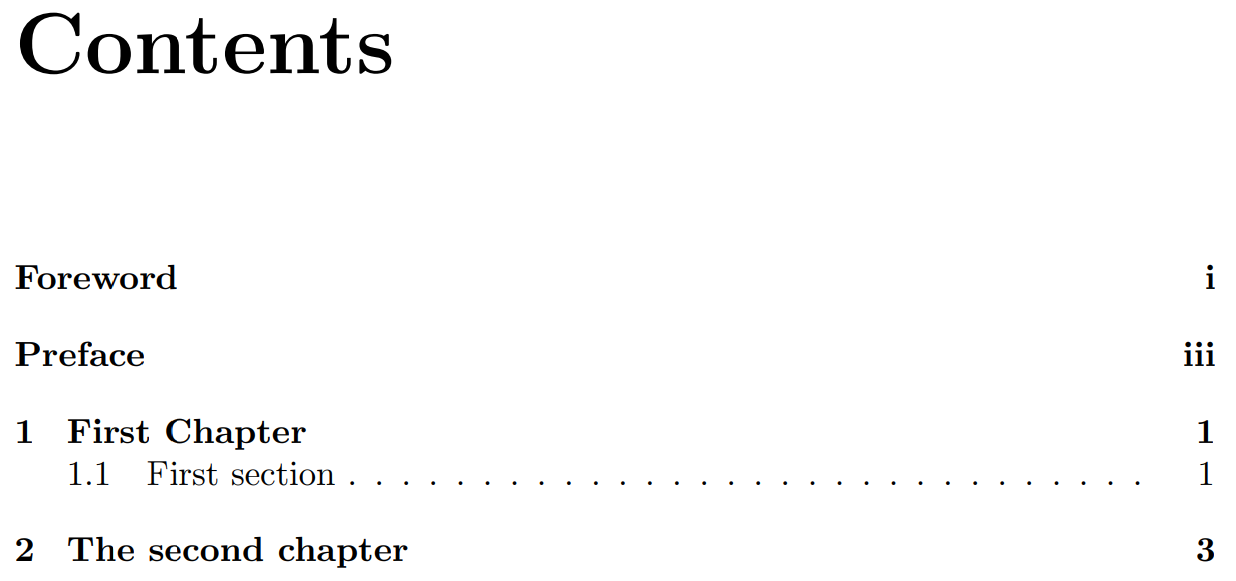
The book class suppresses the page number on the title page automatically when frontmatter is active. You do not need to add any special command to hide it. The abstract page will display “i” (or “ii” depending on your title page setup), and Chapter One will open at “1”.
Using pagenumbering in article-class documents
If you are using the article class — less common for a full thesis but sometimes used for shorter dissertations — you will not have frontmatter and mainmatter available. Use the pagenumbering command directly:
pagenumbering{roman}   % Lowercase Roman numerals from this point
% ... front matter content ...

pagenumbering{arabic}  % Arabic numerals from this point, counter resets to 1
% ... chapter content ...
You can also combine pagenumbering{arabic} with setcounter{page}{1} to be explicit about the restart, though pagenumbering resets the counter automatically.
Suppressing the number on a specific LaTeX page
To suppress the page number on the title page only (without affecting surrounding pages), add thispagestyle{empty} on the title page. Most thesis templates include this by default, but it is worth checking:
begin{titlepage}
  thispagestyle{empty}  % Suppresses header and footer on this page only
  % ... title page content ...
end{titlepage}
Institution-Specific Variations to Check
While the Roman-to-Arabic convention is near-universal, a small number of institutions have diverged. Before finalising your thesis page numbering, verify two things against your own graduate school’s guidelines.
Placement: bottom centre vs. top right
The University of Michigan’s Rackham guidelines specify bottom centre. Oxford’s guidance allows top right or bottom centre, with the college having the final say. Harvard’s GSAS guidelines permit bottom centre or top right. Check your own institution’s preference — this is one of the details examined during the binding check.
Whether the abstract page is numbered
Most institutions show a Roman numeral on the abstract (typically ii). However, some require the abstract page number to also be suppressed, with visible numbering beginning only on the acknowledgements or table of contents. The Cambridge Computer Laboratory, for instance, recommends a single unbroken Arabic sequence for the entire document — a notable departure from the convention described in this guide. Always defer to your graduate school’s formatting manual over generic guides, including this one.
Appendices and references
At some institutions, particularly in the United States, appendices are numbered with a separate prefix (e.g. A-1, A-2, B-1, B-2) rather than continuing the Arabic sequence. If your institution requires this, you will need an additional section break before each appendix and a reformatted page-number field that combines a letter prefix with the counter. Check the appendix requirements in your institution’s formatting manual. The full guide to structuring and paginating thesis appendices covers what belongs in an appendix, how to label it, and how page numbering interacts with appendix organisation.
Structuring appendices correctly — including labelling, cross-referencing, and page-number integration — is also covered in the full guide to PhD thesis structure chapter by chapter, which walks through every component of the document from the title page to the final appendix.
Once your page-number scheme is confirmed, the next priority is ensuring your table of contents accurately reflects those page numbers. An auto-generated TOC in Word will pick up the correct Roman and Arabic numbers automatically — but only if your heading styles are applied consistently. The step-by-step walkthrough of how to write a complete thesis from first draft to submission includes a dedicated section on TOC generation and updating.
Frequently Asked Questions
Does the title page count as page i even if no number is displayed?
Yes. The title page is universally counted as page i of the front matter, even though the number is suppressed. This means the abstract becomes page ii, the acknowledgements page iii, and so on. The count is unbroken; only the display is hidden on the title page.
Should I use uppercase or lowercase Roman numerals for the front matter?
Lowercase Roman numerals (i, ii, iii, iv, v…) are the dominant convention at almost all UK and US universities. Uppercase Roman numerals are occasionally specified by individual departments, but if your guidelines do not explicitly say “uppercase”, use lowercase. This is what Word refers to as the “i, ii, iii” format option in the Page Number Format dialog.
What type of section break should I use in Word?
Always use a Next Page section break (Layout → Breaks → Section Breaks → Next Page) when transitioning between the front matter and the body of your thesis. Do not use Continuous, Even Page, or Odd Page section breaks for this purpose, as they behave differently with regard to page-number formatting. A Continuous break stays on the same page and does not reliably reset counters in all versions of Word.
My page numbers reset to 1 at every chapter — how do I stop that?
This happens when every chapter begins with a Next Page section break that also restarts the page counter. Check whether someone has inserted section breaks between chapters — they may be there from an earlier template. Either delete the inter-chapter section breaks (replacing them with simple page breaks if needed) or, for each section break after Chapter One, go to Format Page Numbers, select “Continue from previous section”, and click OK. The counter will then run uninterrupted from Chapter One through to the end.
In LaTeX, how do I make the page number invisible on just the title page?
Add thispagestyle{empty} immediately after begin{titlepage} (or on the first line of your title page content if you are not using the titlepage environment). This suppresses both the header and footer on that page only, without affecting the numbering sequence on surrounding pages. Most university LaTeX thesis templates include this by default, but it is worth confirming it is present in your template.
Do references and appendices get their own page-numbering section?
In most UK and US institutions, references and appendices continue the same Arabic sequence as the main chapters — no new section break or counter reset is needed. Some North American institutions, however, require appendix pages to be numbered with a letter-number prefix (A-1, A-2…). Always check your institution’s formatting guide for the appendices section specifically, as this is one of the few areas where institutional practice genuinely varies.
Correct thesis page numbering is one of those technical details that takes under an hour to set up properly but can cause genuine last-minute stress if left until the night before submission. Work through the steps above — section break, unlink, format — and verify the result in a PDF export. If you are working in LaTeX, two commands do the job. The goal is a document where your examiner can open any page, see the expected number, and focus entirely on your research.
If you are managing a thesis that is also over its word limit, the guide on cutting thesis word count without losing substance covers a systematic four-pass editing process that pairs well with the formatting steps described here.
Write your thesis with AI
Structure, draft, cite, and format your thesis faster with Tesify’s AI writing tools, automatic bibliography, and plagiarism checker. Free to start, no credit card required.






Leave a Reply