

How to Write Your Thesis Faster with AI Outlining in 2026 (Without Ghostwriting a Word)
Your research is done. You have a folder full of annotated PDFs, three months of field notes, and a supervisor who keeps asking when the first draft lands. Yet every time you open a blank document, you stare at the cursor for an hour and close the laptop. This is not a discipline problem — it is a structure problem. And how to write thesis faster with AI outlining is the answer more students are reaching for in 2026: not to have AI write for them, but to use it as a scaffolding tool that turns a chaotic pile of research into a clear chapter architecture, so that when you sit down to write, you already know exactly what goes where.
The distinction matters enormously. AI ghostwriting — pasting a prompt and submitting the output — is a growing academic integrity minefield. But AI outlining is categorically different: you feed the tool your own notes, research questions, and sources; it returns a logical structure with section goals, argument sequencing, and transition cues; you then write every sentence yourself. The output is your scholarship, built on a skeleton the AI helped you draw. Most UK, US, and Australian universities already draw this line explicitly in their AI policies, permitting structural assistance while prohibiting submitted AI-written prose.
This guide gives you a concrete, step-by-step workflow for using AI outlining to cut weeks off your writing timeline — with realistic before/after benchmarks, a look at where the time actually goes, and a clear explanation of how Tesify handles the outlining step inside an academically safe environment.
Why Outlining Is the Real Bottleneck (Not the Writing)
Most students assume their thesis takes so long because writing is hard. Research on academic procrastination tells a more precise story. A 2024 study by Purnomo and Rejeki published in the International Journal of Doctoral Studies found that fear of evaluation, perfectionism, and perceived lack of structure were the dominant drivers of thesis procrastination — not laziness or poor time management. Students do not stall because they cannot write; they stall because they do not know what to write next.
This is the planning-paralysis loop: you have too many notes, too many possible angles, and no clear sequence. So you re-read papers instead of drafting. You reorganise your reference manager instead of committing to an argument. You open a new browser tab instead of writing the paragraph you know needs to go here. Every session that starts with “let me just get organised first” ends with no new words on the page.
The research on this is consistent. A structured outline eliminates the decision load at the sentence level. When a writer knows the goal of each section, the argument it must advance, and the sources it needs to cite, the actual writing becomes execution rather than invention. That shift — from invention under pressure to execution against a plan — is what compresses a 10-week writing timeline into 3 weeks for many students who adopt AI outlining.
If you have ever struggled to get past the first page, the article on how to overcome writer’s block on your thesis has 12 evidence-based techniques — many of which pair directly with the outlining workflow described below.
What AI Outlining Actually Means (and What It Is Not)
The term “AI writing” covers a spectrum that students and universities often conflate, and the conflation creates unnecessary anxiety. Here is a clean distinction:
| Method | What AI Does | Who Writes the Prose | Typically Permitted? |
|---|---|---|---|
| AI Ghostwriting | Generates full paragraphs and chapters from a prompt | AI | No — nearly universally prohibited |
| AI Outlining | Structures your notes into a logical chapter plan, section goals, argument sequence | You | Yes — permitted by most policies |
| AI Editing | Improves clarity, grammar, and tone of your prose | You (with suggestions) | Permitted at basic level; check rewrite thresholds |
| AI Literature Mapping | Identifies themes, gaps, and connections across your sources | You | Yes — research assistance |
AI outlining sits firmly in the permitted category at the vast majority of institutions precisely because it does not generate academic argument — it organises the arguments you have already developed through your research. You feed it your research question, your key sources, your preliminary findings, and your chapter goals; it returns a logical blueprint. The intellectual content is yours throughout.
For a full picture of what falls inside and outside most university AI policies, the honest 2026 ChatGPT thesis writing guide covers the compliance landscape in detail, including specific policies from UK Russell Group and R1 US institutions.
For a full breakdown of which AI tools are specifically built for this use case — with academic-integrity ratings — see the best AI thesis writing tools compared in 2026.
Before vs. After: Where the Time Goes
Thesis First-Draft Timeline: Traditional vs. AI-Outlined
| Phase | Traditional | AI-Outlined |
|---|---|---|
| Structuring / planning | 2–3 weeks | 1–2 days |
| Literature review draft | 2–3 weeks | 1 week |
| Methods chapter | 1–2 weeks | 3–4 days |
| Results + Discussion | 3–4 weeks | 2 weeks |
| Total first draft | 10–12 weeks | 4–5 weeks |
To understand the productivity gain, it helps to map a typical thesis writing timeline against one that uses AI outlining at every chapter transition.
Traditional Thesis Writing Timeline (No Structured Outlining)
- Week 1–2: Re-reading sources, trying to decide on a literature review structure — little to no new writing
- Week 3–4: Literature review first draft (slow; frequent restarts when sections feel disconnected)
- Week 5–6: Methods chapter — moderate speed, but gaps in logic cause rewrites
- Week 7–9: Results/findings — fast if data is ready, but narrative framing takes time
- Week 10–12: Discussion and conclusion — highest risk of writer’s block; argument feels unclear without a pre-built structure
Total: 10–12 weeks for a first draft, with 30–40% of that time spent on planning and reorganisation rather than writing.
AI-Outlined Thesis Writing Timeline
- Day 1–2: Feed research notes + sources into AI outlining tool; receive structured chapter-by-chapter plan with section goals and argument sequence
- Week 1: Literature review first draft — sections write quickly because structure is pre-decided
- Week 2: Methods chapter — logical flow pre-mapped; you fill in the methodology narrative
- Week 3: Results/findings — framing aligned to the outline created at the start
- Week 4–5: Discussion and conclusion — argument structure already defined; writing is execution
Total: 4–5 weeks for a comparable first draft, with planning compressed to hours rather than weeks.
The difference is not that AI wrote faster — it is that planning paralysis was eliminated. Every session began with clear intent: this section argues X, uses sources Y and Z, and transitions to the next section by establishing W.
The 6-Step AI Outlining Workflow
Here is the exact process to implement AI outlining for your thesis, from raw notes to a chapter plan you can execute against.
Step 1: Consolidate Your Research Notes Into a Single Document
Before you touch any AI tool, gather your core materials: your research question, your key findings or data, your annotated source list (author, year, main argument, relevance to your thesis), and any conceptual frameworks you are working with. This does not need to be tidy — bullet points and fragments are fine. The AI’s job is to impose structure on this raw material, not to receive a polished input.
Step 2: Define Your Thesis Statement and Chapter Goals
Write a single clear thesis statement — one or two sentences that state your central argument and how you will support it. Then write one sentence per chapter describing what that chapter must accomplish. This step is non-negotiable: the AI outline is only as good as the input you give it. If your thesis statement is vague, the outline will be vague.
Step 3: Generate the Chapter-Level Outline
Feed the AI your thesis statement, chapter goals, and key sources. Ask it to produce a section-by-section outline for each chapter, specifying: the argument each section makes, the evidence it draws on, and the logical transition to the next section. Review the output critically — you will often find that the AI has proposed a structure that is technically logical but misses a nuance only you know from your fieldwork or reading. Adjust accordingly.
Step 4: Validate Argument Flow Across Chapters
Read the full outline from introduction to conclusion as if it were a thesis. Ask yourself: does each chapter build on the last? Does the discussion chapter directly address the findings framed in the results? Does the conclusion answer the research question established in the introduction? AI outlining tools can generate section-level coherence but miss chapter-level coherence — this validation pass is where you add the intellectual judgment that makes the thesis yours.
Step 5: Assign Sources to Sections
Go through your reference list and assign each source to the section where it belongs. This is the step that makes the actual writing fast: when you open a section to write, your sources are already waiting. You are not writing and hunting for references simultaneously — you are writing with your evidence pre-loaded.
Step 6: Write Section by Section, Using the Outline as Your Spec
Write one section at a time. The outline tells you the argument; you write the prose that makes that argument in your voice, with your evidence. When you finish a section, move to the next. The outline is not a cage — you can and should deviate when your thinking evolves — but it eliminates the blank-page moment at the start of every session.
Chapter-by-Chapter Breakdown: What AI Outlining Contributes
Introduction
The introduction is where most students lose a week. AI outlining helps by generating a structure that sequences: background context → research gap → research question → significance → thesis structure overview. The hardest part — identifying the gap your research fills — is something you determine; the AI helps you position it clearly in relation to the sections that follow.
Literature Review
This is where AI outlining delivers its largest time saving. A literature review is not a summary list — it is a thematic argument about what the existing research shows, where it agrees, where it conflicts, and what it leaves unresolved. AI outlining can take 15–30 annotated sources and cluster them into coherent themes, then sequence those themes to build toward your research gap. What typically takes two weeks of “reading and thinking” compresses to an afternoon of reviewing the proposed structure and filling in your own synthesis.
Methodology
Methodology chapters follow a predictable logical architecture: research paradigm → design choice → data collection → analysis approach → validity/reliability → ethical considerations. AI outlining ensures this sequence is airtight and that each choice is linked to your research question. For many students, the methods chapter is the easiest to outline and therefore the easiest to write once the scaffold is in place.
Results / Findings
The outline for a findings chapter sequences your data presentation to mirror the research questions or objectives you set in your introduction. This creates the coherence that makes your discussion chapter straightforward: when findings are framed to answer the questions posed at the outset, the discussion almost writes itself. See also the guide to writing your dissertation discussion chapter with AI for how to extend this approach into the interpretive sections.
Discussion and Conclusion
These are the chapters most likely to stall without a pre-built structure. The AI outline for a discussion chapter sequences: restatement of findings → comparison with existing literature → theoretical implications → practical implications → limitations → directions for future research. The conclusion maps directly to your original research question and circles back to your thesis statement. With these architectures defined in advance, writing becomes filling in a form you understand completely rather than constructing an argument from scratch under deadline pressure.
Academic Integrity and Ethics: What Your University Allows
The key principle across all major institutional AI policies in 2026 is attribution and authorship. If AI outlining helped you structure your chapters, you can disclose this accurately: “AI tools were used to assist with structural planning; all written content is the author’s own.” This kind of disclosure is increasingly expected and reflects honest scholarship rather than concealment.
Where institutions draw the line is on submitted AI-generated text — prose, arguments, analysis, and interpretation that the AI wrote and the student submitted as their own. AI outlining never crosses this line because no AI-generated text enters your thesis. The outline is a private planning document, not submitted work.
For a detailed comparison of AI writing tools and their academic-integrity profile, the best AI thesis writing tools compared in 2026 covers how each tool handles the line between scaffolding and ghostwriting.
How Tesify Makes AI Outlining Safe and Fast
Tesify was built specifically for the academic writing context, which means its AI outlining workflow is designed around the constraints and requirements of thesis writing — not general content creation or creative writing where those constraints do not apply.
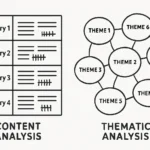
When you start a thesis project in Tesify, the platform walks you through a structured intake: your research question, your discipline, your chapter structure, your key sources, and your target word count per chapter. From these inputs, it generates a chapter-level outline that is calibrated to the conventions of your discipline. A social science thesis structured around thematic analysis looks different from a STEM thesis structured around experimental results — Tesify accounts for this rather than applying a generic template.
Three specific features make the outlining step faster and safer:
- Source-linked section planning: Each section in your outline is tagged to the sources you have assigned to it, so when you write you have the right references immediately at hand.
- Argument coherence check: Before you begin writing, Tesify flags sections where the argument sequence is unclear or where a logical gap exists between chapters — issues that would otherwise only surface at the revision stage.
- AI Editor for prose refinement: Once you have written your sections, Tesify’s AI Editor helps you tighten and clarify your own prose without rewriting it — improving academic tone and sentence clarity while keeping your voice and argument intact.
The result is a writing environment where the two biggest time sinks — planning paralysis and post-draft editing — are compressed into manageable, discrete steps rather than open-ended processes that expand to fill whatever time you have.
Stop staring at blank pages. Start writing against a plan.
Tesify’s AI outlining workflow turns your research notes into a structured chapter plan — free to try, no credit card needed.
3 Common Mistakes That Slow You Down Even With AI Outlining
Mistake 1: Treating the AI Outline as Final
The AI-generated outline is a starting point, not a contract. Students who treat it as fixed stop reading it critically and miss places where the structure does not match the actual nuance of their findings. Review every section goal and ask: is this what my research actually shows? Revise the outline before you write, not after.
Mistake 2: Outlining Without a Clear Thesis Statement
AI outlining cannot generate a thesis statement for you — and it should not. If you feed the tool a vague question (“I’m writing about social media and mental health”), you will get a generic structure that fits a hundred possible theses. Your thesis statement is the specific claim your work makes. Write it yourself, make it precise, and then let the AI build structure around it.
Mistake 3: Skipping the Argument Validation Pass
The most common failure mode after AI outlining is discovering in week 6 that the discussion chapter cannot address the findings because the findings were not framed to answer the research questions. The validation pass described in Step 4 above is where you catch this — and it takes 30 minutes of focused reading, not a full day of restructuring. Skip it and you will lose that time anyway, just later and under greater pressure.
For additional techniques to keep writing momentum going — particularly when perfectionism or anxiety stall a specific section — the evidence-based strategies for overcoming thesis writer’s block are a practical companion resource.
Frequently Asked Questions
Is using AI to create a thesis outline considered cheating?
For most universities in 2026, using AI to plan or outline your thesis structure is not academic misconduct, provided all submitted prose is your own. AI outlining is analogous to using a mind-mapping tool or talking through your chapter structure with a librarian — it organises your thinking but does not write your argument. Always check your institution’s specific AI policy and disclose AI tool use where your guidelines require it.
How much time can AI outlining realistically save on a thesis?
Students consistently report compressing first-draft timelines from 10–12 weeks to 4–6 weeks when they use structured AI outlining at every chapter transition. The saving comes primarily from eliminating planning paralysis — the hours spent deciding what to write next rather than writing. The actual writing speed does not change; the time wasted before each writing session does.
Can I use AI outlining for a literature review specifically?
Yes — the literature review is the chapter that benefits most from AI outlining. You supply your annotated source list and research gap; the tool clusters your sources into coherent themes and sequences those themes to build toward your gap. The result is a ready-to-execute section plan rather than a sprawl of notes with no clear order. You still synthesise and write each section yourself.
What is the difference between Tesify and ChatGPT for thesis outlining?
ChatGPT can produce generic chapter outlines but lacks academic context, source integration, and discipline-specific conventions. It also tends to generate plausible-sounding but fabricated sources when asked to suggest references. Tesify is built for the academic thesis context: it links outline sections to your actual sources, follows discipline-specific chapter conventions, flags argument gaps before you start writing, and includes plagiarism checking to verify your finished draft. It is a complete academic writing environment rather than a general-purpose chat tool.
Do I need to disclose AI outlining use in my thesis?
Disclosure requirements vary by institution. As a general rule in 2026: if your university requires an AI use statement, include a brief note that AI tools assisted with structural planning and that all written content is your own. If your institution requires no disclosure for planning tools, you are not obligated to mention it — but honesty with your supervisor is always advisable. Proactive disclosure is low-risk; undisclosed use of ghostwriting tools is high-risk.
Should I use AI outlining before or after I finish my research?
AI outlining works best once you have your core sources annotated and a preliminary answer to your research question. You do not need all your data collected — an early outline for the introduction and literature review can begin while fieldwork or experiments are still in progress. For the results and discussion chapters, wait until your data analysis is complete. The outline for those chapters should reflect what your research actually found, not what you expected to find.
Beyond Outlining: Completing Your Thesis with Tesify
AI outlining gets your draft moving. But a complete thesis workflow also needs clean citations, a plagiarism-free submission, and polished academic prose. Tesify covers all three in one platform:
- Tesify Auto Bibliography — generates accurate references in APA, MLA, Harvard, and Chicago as you write, eliminating the 5–10 hours most students spend formatting citations manually at the end.
- Tesify Plagiarism Checker — scans your draft before submission to catch unintentional similarity, paraphrase flags, and AI-generated content markers that university detection systems will catch.
- Tesify AI Editor — improves clarity, transitions, and academic tone in your own prose without rewriting your argument.
For a full overview of what the platform includes and how each module fits together, the guide to using an AI thesis writer ethically in 2026 covers the complete workflow from first notes to submitted draft.
Your thesis outline is waiting. Your deadline is not.
Join thousands of students who are writing faster, more confidently, and with full academic integrity using Tesify’s AI outlining and writing tools.
Write your thesis with AI
Structure, draft, cite, and format your thesis faster with Tesify’s AI writing tools, automatic bibliography, and plagiarism checker. Free to start, no credit card required.


Leave a Reply