
Free Citation Generator: Create 100 Citations in 1 Hour
You’ve spent three weeks writing the most important chapter of your dissertation. The argument is tight, the evidence is solid — and then your supervisor sends it back. “References are inconsistent.” That stinging feedback, right at the finish line, costs you days of panic-formatting. Sound familiar?
Citation formatting is one of the most time-consuming, error-prone parts of any thesis or dissertation. A single misplaced comma in an APA entry can trigger an academic integrity flag. Getting 80 or 100 references formatted correctly, by hand, can easily eat 6–10 hours you simply don’t have.
Here’s the good news: a free citation generator — the right one — can cut that time to under an hour. This guide walks you through exactly how to do it, which tools actually work, and how to avoid the citation traps that catch most students out.
Why Citation Formatting Kills Your Time
Most students underestimate how long citations actually take. Research from dissertation support forums consistently shows students spending 8–15 hours on bibliography formatting alone — time that should go into their actual argument.
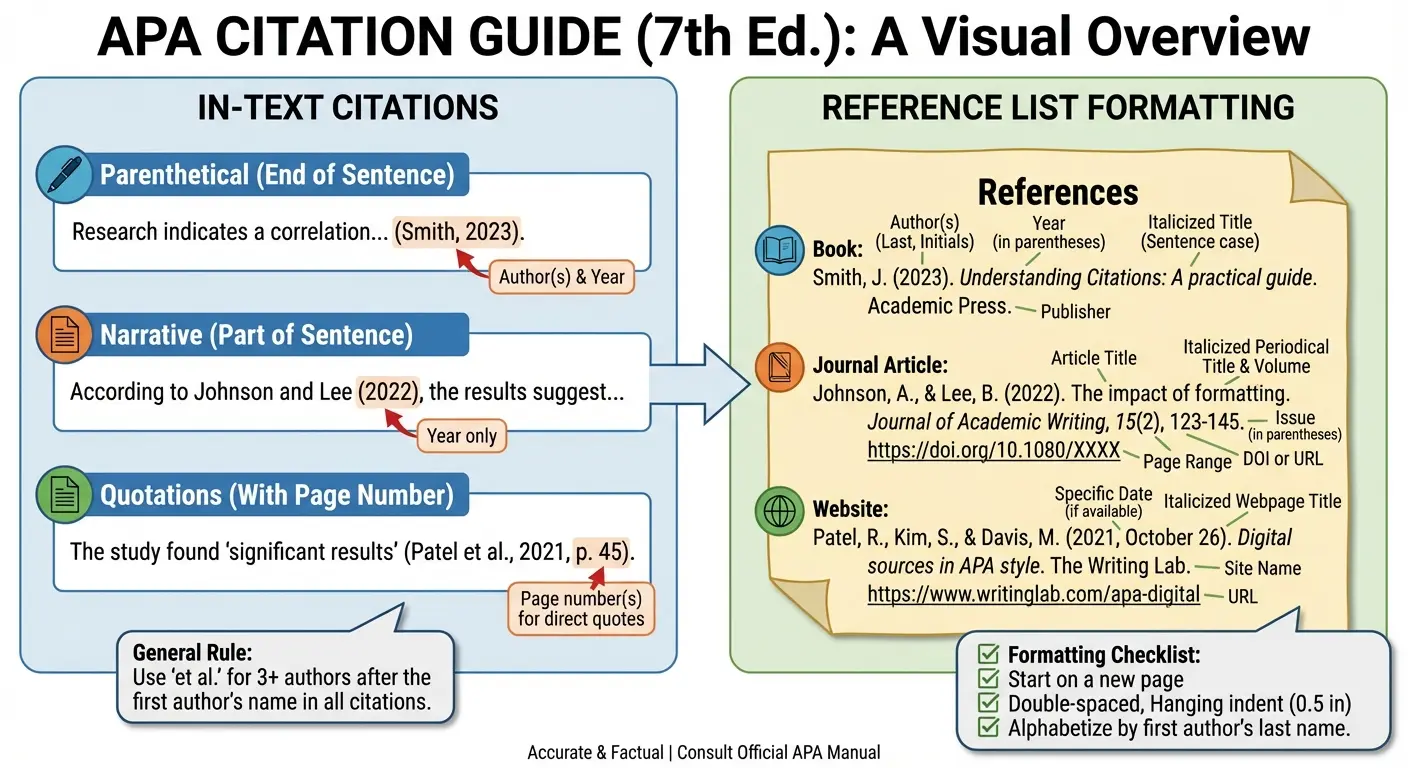
The problem isn’t laziness. It’s that citation rules are genuinely complicated. APA 7th edition alone has different formatting rules for journal articles, edited books, conference papers, websites, datasets, and social media posts. Miss a detail — a missing issue number, an incorrect DOI format, an author listed as “et al.” too early — and your bibliography falls apart.
What most people miss is that the pain isn’t just the formatting itself. It’s the constant switching between your document, your source list, and the style guide. That cognitive load adds up fast. Every interruption breaks your writing flow and adds mental fatigue on top of already exhausting dissertation work.
The 2025 HEPI Student Generative AI Survey found that 67% of UK university students now use AI tools to support their academic work — and bibliography management consistently ranks among the top three tasks they want automated. Students aren’t looking to cheat. They’re looking to stop wasting hours on mechanical formatting that adds zero intellectual value to their work.
That’s exactly the problem a good free citation generator solves.
What a Free Citation Generator Actually Does
A free citation generator is an online tool that automatically formats bibliographic information — author names, titles, publication dates, DOIs, URLs — into a specific academic citation style (APA, MLA, Chicago, Harvard, Vancouver). You input source details or a DOI/ISBN, and the tool outputs a correctly formatted reference you can copy directly into your document.
Good citation generators do more than shuffle text around. They pull metadata from academic databases, cross-reference DOIs with Crossref and PubMed, autofill missing fields where possible, and flag incomplete entries before you export. The best ones — like Tesify’s Auto Bibliography — integrate directly into your thesis document so you never have to leave your writing environment.
What they don’t do — and this is worth being honest about — is guarantee 100% accuracy without any human review. Database metadata is sometimes incomplete. Journal articles occasionally have missing volume numbers. Author names can be listed inconsistently across sources. A citation generator is a power tool, not a magic eraser. You still need to verify, especially for your dissertation.
That said? Even at 95% accuracy, a tool that formats 100 citations in 20 minutes and requires 15 minutes of checking beats 10 hours of manual work every single time.
Best Free Citation Generators Compared (2025)
Not all citation tools are equal. Here’s an honest breakdown of the main options students actually use:
| Tool | Free Tier | Styles Supported | Bulk Import | Thesis Integration |
|---|---|---|---|---|
| Tesify Auto Bibliography | Yes (full features) | APA, MLA, Chicago, Vancouver, Harvard | Yes — DOI/ISBN batch | Native thesis editor |
| Zotero | Yes (300MB storage) | 9,000+ styles | Yes — browser capture | Word/LibreOffice plugin |
| CiteSeer / Google Scholar | Yes | APA, MLA, Chicago, Harvard | No | Copy-paste only |
| Scribbr Citation Generator | Yes (basic) | APA, MLA, Chicago, Harvard | No | Copy-paste only |
| ChatGPT | Yes (limited) | Any (text generation) | No | None — high hallucination risk |
A quick note on ChatGPT: students use it for citation help constantly, but it’s genuinely risky. ChatGPT fabricates DOIs, invents author names, and generates plausible-looking references that don’t exist. The Harvard Library’s initial guidelines on generative AI specifically flag this hallucination problem as a critical risk for academic citation work. Don’t use a language model to format references. Use a tool that pulls from real bibliographic databases.
For free, open-source reference management, Zotero remains one of the most trusted options for capturing and organising sources — though it takes more setup than newer AI-integrated tools.
How to Create 100 Citations in 1 Hour: Step-by-Step
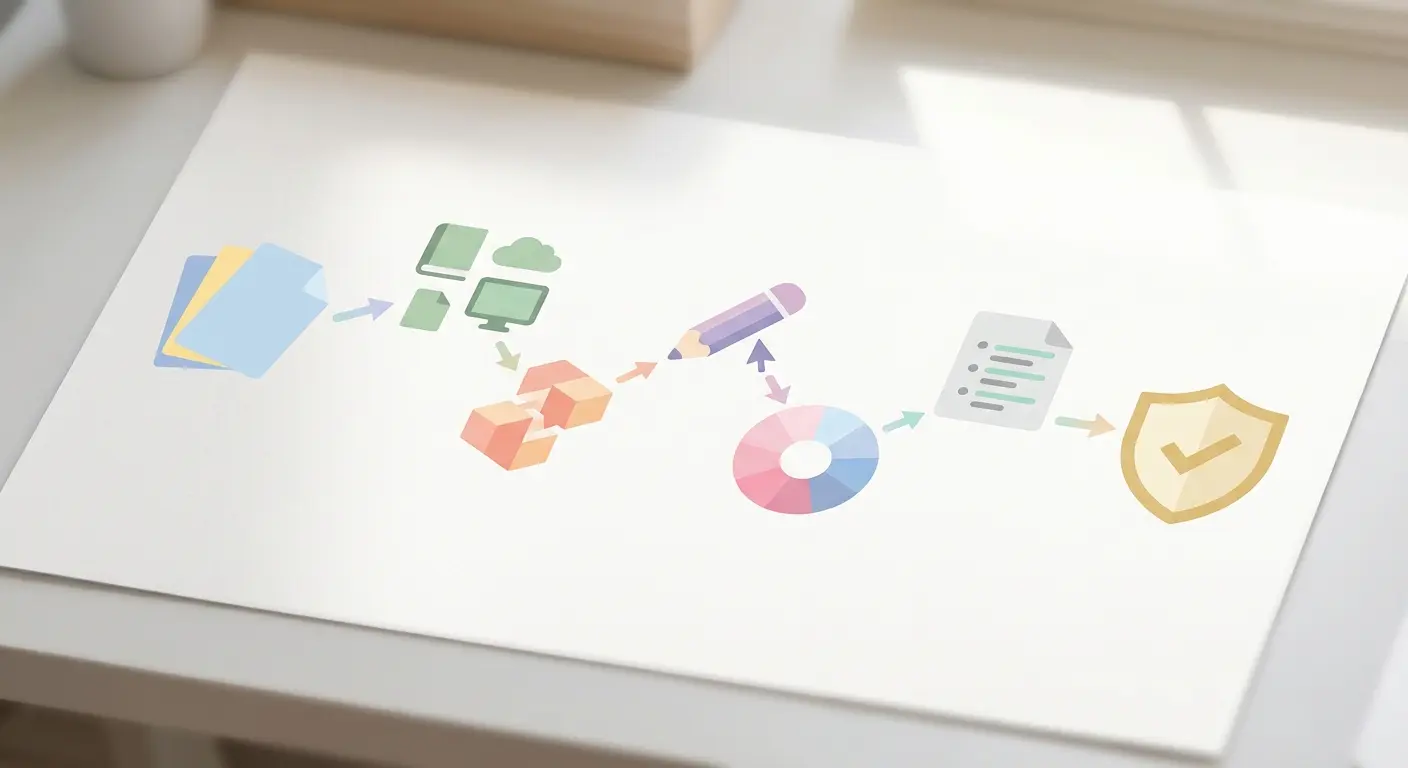
Here’s where it gets interesting. Most students don’t fail at citation formatting because they use bad tools — they fail because they have no system. This workflow changes that.
Step 1: Collect All Your Sources First (10 minutes)
Before opening any citation tool, compile your entire source list in one place. Go through your document, pull every reference you’ve cited (in-text), and dump them into a spreadsheet or plain text file. Include DOIs, URLs, ISBNs, or full title + author where you have them. Don’t format anything yet — just collect. This single step stops the constant back-and-forth that kills most students’ time.
Step 2: Sort Sources by Type (5 minutes)
Group them: journal articles (have DOI), books (have ISBN), websites (have URL), conference papers, dissertations, datasets. Citation tools work fastest when you batch by type. You’ll also catch format exceptions early — for example, online-only journals with no volume number, or government reports with unusual author attribution.
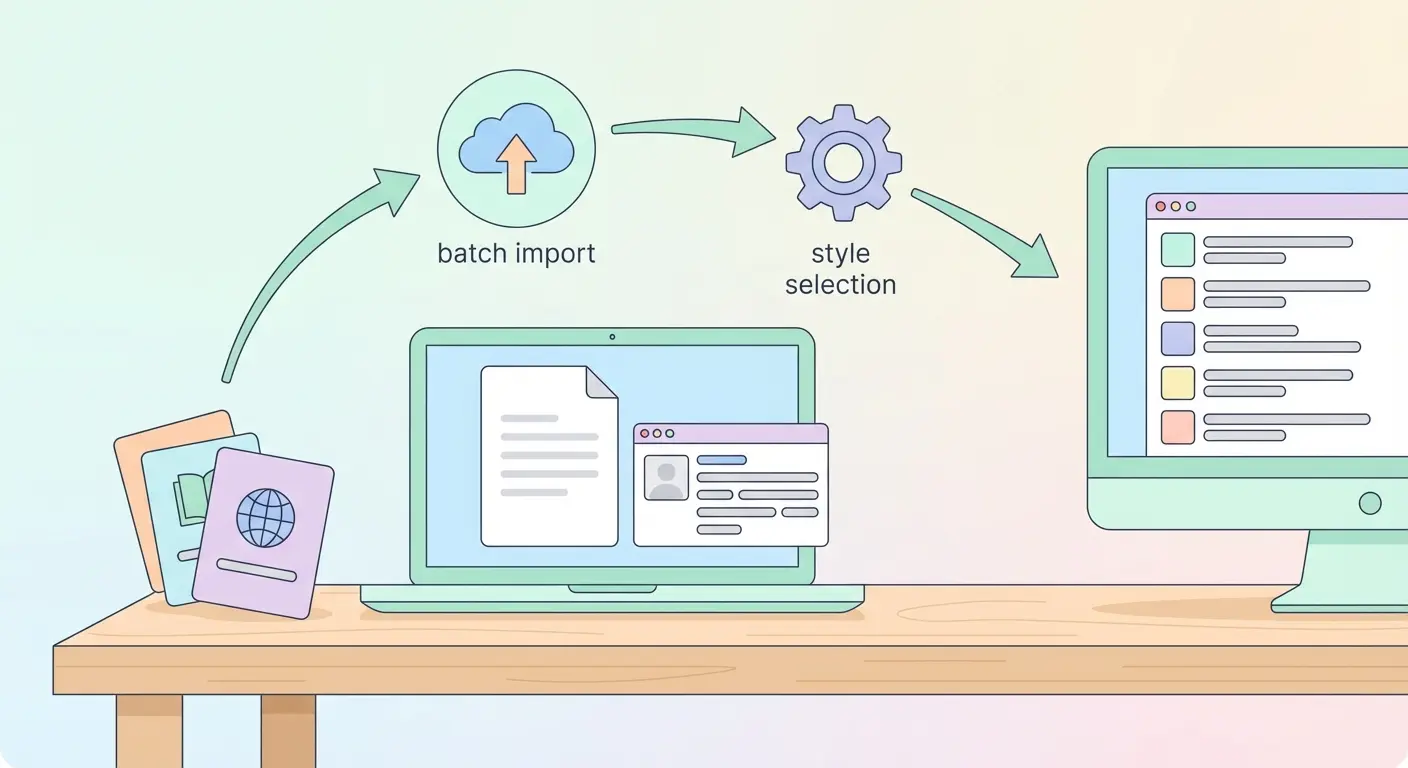
Step 3: Batch-Import Using DOIs and ISBNs (15 minutes)
For journal articles, paste your DOIs into your citation generator’s batch import field. Most modern tools (including Tesify’s Auto Bibliography) let you paste 20–50 DOIs at once and pull full metadata from Crossref and PubMed in seconds. Books: use ISBNs. Websites: paste the URL and verify the auto-filled author/date fields manually.
Step 4: Handle Missing Sources Manually (10 minutes)
Some sources won’t have clean DOIs — conference papers, grey literature, older books. Use the manual entry form. This is the slowest part, but with a good tool it’s still just 2–3 minutes per tricky source. Don’t get stuck here. Flag it with a placeholder and keep moving.
Step 5: Select Your Citation Style and Preview (5 minutes)
Set your style — APA 7th, MLA 9th, Chicago 17th, Harvard, or Vancouver — and preview the full reference list. Check for obvious formatting errors: missing periods, incorrect capitalisation of journal titles in APA, inconsistent author formatting. Look at 10 random entries, not every one. You’re doing a spot check, not a line edit.
Step 6: Export and Integrate (5 minutes)
Export as Word, PDF, or directly into your thesis document. With Tesify, the bibliography auto-populates inside your existing thesis editor — no copy-paste required. With standalone tools like Zotero, you’ll export a formatted list and paste it into your document’s bibliography section.
Step 7: Final Verification (10 minutes)
Cross-check 10% of your citations (10 out of 100) against the original sources. Focus on: correct author order, accurate page numbers for direct quotes, correct year (especially for revised editions), and proper DOI formatting. Fix any errors, run a final consistency check across the whole list, and you’re done.
Total time: 60 minutes. That’s not an optimistic estimate — it’s what a systematic workflow actually produces once you stop treating citations as an afterthought.
Citation Style Rules: APA, MLA, Chicago, and Harvard
Understanding the core logic of each style — even briefly — helps you catch generator errors faster. You don’t need to memorise every rule. You need to know where each style is most likely to go wrong.
For a full breakdown of which style your university requires and how each format handles edge cases, the Standardize Citations 2025 guide on Tesify covers APA, MLA, Chicago, and Harvard side-by-side with real dissertation examples — worth bookmarking before you format your references list.
| Style | Most Common In | In-Text Format | Top Generator Error |
|---|---|---|---|
| APA 7th | Psychology, Education, Social Sciences | (Author, Year) | Missing DOI format / wrong edition rules |
| MLA 9th | Literature, Humanities, Language | (Author page) | Container structure errors for online sources |
| Chicago 17th | History, Arts, Theology | Footnotes or Author-Date | Footnote vs. bibliography format confusion |
| Harvard | UK Universities (wide range) | (Author Year) | No single official standard — varies by university |
| Vancouver | Medicine, Biomedical Sciences | Numbered [1] | Journal abbreviation errors |
One counterintuitive insight: Harvard style is actually the most likely to generate errors, not because it’s complex, but because there is no single official Harvard standard. Every university has its own version. Always download your institution’s specific Harvard guide and cross-reference with any generator output — especially for edited books and secondary sources.
Tesify Auto Bibliography: The Smarter Solution for Thesis Students
Stop wasting time copying formatted references from one window to another. That extra friction — even when it’s only five minutes per session — adds up to hours of lost time across a dissertation project.
Tesify’s Auto Bibliography is built differently from standalone citation generators. It lives inside your thesis document. When you add a source — via DOI, ISBN, or the integrated Google Scholar / PubMed / JSTOR / ProQuest search — the reference is immediately added to your bibliography in the correct format. Change your citation style from APA to Harvard? The entire bibliography reformats in one click.
Here’s what the workflow actually looks like for dissertation students:
- Search for your source directly inside Tesify using a DOI, article title, or author name. The system pulls live data from Google Scholar, PubMed, JSTOR, and ProQuest.
- Add it to your project. The source is saved to your reference library and the in-text citation is inserted at your cursor position automatically.
- Your bibliography updates in real-time. No separate reference management tool. No export. No copy-paste.
- Switch citation style any time — APA 7th, MLA, Chicago, Vancouver, Harvard — and every citation in the document updates instantly.
- Export to PDF, Word, or LaTeX when you’re done. The bibliography is already formatted and embedded.
Over 9,000 students are already using Tesify to finish their dissertations faster. The students who get the most out of it aren’t just using the bibliography tool in isolation — they’re running it alongside the Tesify AI Editor, which handles paragraph rewriting, academic language correction, and coherence feedback in the same environment. It’s a complete thesis workflow, not a collection of disconnected tools.
Stop formatting references manually.
Join 9,000+ students who use Tesify to generate accurate citations in APA, MLA, Chicago, Harvard, and Vancouver — directly inside their thesis document.
Common Citation Generator Mistakes (and How to Fix Them)
Even the best citation tools make mistakes — and most of them follow predictable patterns. Knowing where generators fail means you can check smart instead of checking everything.
Mistake 1: Trusting DOI Metadata Blindly
DOIs pull from Crossref, which relies on publishers uploading accurate metadata. Publishers don’t always do this. The most common issues: wrong publication year (especially for ahead-of-print articles), missing volume/issue numbers, and author names in the wrong order. Fix: Always cross-check the generated citation against the actual article page for the first 10% of your DOI-imported sources.
Mistake 2: Website Citations With No Author or Date
Generators struggle with websites that have no clear author or publication date. In APA 7th, “n.d.” (no date) and the organisation name as author have specific formatting rules most tools handle incorrectly. Fix: For government reports, NGO publications, and organisational websites, enter these manually and follow your style guide’s “no author” format directly.
Mistake 3: Book Editions and Editors
Edited books, translated works, and specific editions are notorious for generator errors — particularly around the “(Ed.)” versus “(Eds.)” distinction in APA and the handling of chapter authors vs. book editors. Fix: For edited volumes, always review these entries manually. They’re worth the extra two minutes.
Mistake 4: Not Updating to the Latest Style Edition
APA 7th replaced APA 6th in 2019. MLA 9th replaced MLA 8th in 2021. Some free citation generators — particularly older web tools — still default to outdated editions. Fix: Check that your tool explicitly states the edition it uses (e.g., “APA 7th Edition”) and confirm with your institution’s referencing guide which edition is required.
For a deeper analysis of where automated citation tools commonly fail and how to validate their output — particularly for PhD and Masters work — the article on automatic citation tool accuracy covers the most critical verification steps with specific examples.
Mistake 5: Ignoring Plagiarism Risk in Your Bibliography
Here’s what most students don’t realise: incorrect citations can create a plagiarism flag. If a source is cited incorrectly — wrong page numbers for a direct quote, wrong author, wrong year — it looks like the citation was fabricated or the quote was lifted without attribution. Academic integrity checkers flag these inconsistencies.
That’s why using Tesify’s Plagiarism Checker as a final step makes sense — it compares your work against millions of scholarly sources including JSTOR, ProQuest, EThOS, ERIC, and Google Scholar, catching both content similarities and citation-level inconsistencies before your submission date.
If you’re building out your full thesis writing toolkit — not just citations but AI-assisted drafting, literature review support, and structure planning — the complete guide to AI writing tools for dissertations in 2025 covers the best workflows for combining citation generators with AI writing assistants effectively.
Frequently Asked Questions
Is a free citation generator accurate enough for a dissertation?
Free citation generators are accurate for the majority of standard sources — journal articles with DOIs, books with ISBNs, and academic websites. Accuracy rates typically sit around 90–95% for common source types. For a dissertation, you should still verify 10% of entries manually, particularly edited books, conference papers, and sources without clean DOIs. A tool like Tesify’s Auto Bibliography, which pulls from live academic databases, significantly reduces the error rate compared to basic free tools.
Can I use ChatGPT to generate citations for my dissertation?
No — using ChatGPT for citations is high risk. ChatGPT regularly fabricates author names, invents DOIs, and generates plausible-looking references that don’t exist. Harvard Library and academic institutions globally warn against using large language models for bibliographic work. Always use a tool that pulls from real bibliographic databases (Crossref, PubMed, JSTOR) rather than generating reference text from a language model.
What citation style should I use for my dissertation?
Your university and department determine which citation style is required — not you. Social sciences and psychology typically require APA 7th; humanities often use MLA 9th or Chicago 17th; UK universities frequently specify Harvard (though the exact Harvard variant varies). Medical and biomedical dissertations typically use Vancouver. Check your department’s dissertation handbook or ask your supervisor before you format a single reference.
How many citations does the average dissertation have?
An undergraduate dissertation (8,000–12,000 words) typically includes 40–80 references. A Master’s thesis (15,000–20,000 words) commonly has 80–150 sources. A PhD dissertation may cite 200–400 or more sources depending on the field. The volume is why systematic citation generation — rather than manual formatting — is so valuable at postgraduate level. Formatting 150 references by hand takes roughly 8–10 hours; a good citation tool does it in under 45 minutes.
Do citation generators cause plagiarism issues?
Citation generators themselves don’t cause plagiarism — they format references that should already be in your work. However, incorrect citations (wrong author, wrong year, missing page numbers for quotes) can trigger academic integrity flags because they may look like fabricated attributions. Always run your completed dissertation through a plagiarism checker like Tesify’s Plagiarism Checker before submission to catch both content similarity issues and citation inconsistencies.
What is the fastest way to build a dissertation bibliography?
The fastest workflow is: collect all sources and their DOIs/ISBNs first, batch-import them into an integrated citation tool like Tesify’s Auto Bibliography, spot-check 10% of entries manually, then export directly into your thesis document. This process handles 100 citations in approximately 45–60 minutes. The key is batching by source type and using DOI imports rather than manual entry wherever possible — manual entry is 5–8 times slower than DOI batch import.
Ready to Finish Your Bibliography Today?
You’ve spent months researching, writing, and refining your argument. Don’t let the final 5% of your dissertation — the bibliography — drag on for days. The workflow in this guide gets it done in under an hour.
If you want to stop switching between tools, stop copy-pasting references, and stop worrying whether your APA formatting is correct, Tesify’s free citation generator is built specifically for this problem. The Auto Bibliography, AI Editor, and Plagiarism Checker work together in one environment designed for exactly the kind of high-stakes writing you’re doing.
Over 9,000 students have already used it to finish their dissertations twice as fast. Free sign-up. No credit card. No reason to spend another evening manually formatting references.
Generate your full bibliography in under an hour.
APA, MLA, Chicago, Harvard, Vancouver — all formats, one click, inside your thesis document. 9,000+ students already trust Tesify with their most important academic work.
Last updated: 2025. Citations statistics sourced from HEPI Student Generative AI Survey 2025. Academic integrity guidelines sourced from Harvard Library and EDUCAUSE Horizon Action Plan on Generative AI.
Write your thesis with AI
Structure, draft, cite, and format your thesis faster with Tesify’s AI writing tools, automatic bibliography, and plagiarism checker. Free to start, no credit card required.





Leave a Reply